
A transport request (TR) in SAP is a container that stores changes to development objects. TRs are used to transport changes from one SAP system to another, such as from a development system to a quality assurance system or from a quality assurance system to a production system.
TRs are created when you make changes to development objects in the SAP ABAP workbench. When you create a TR, you must specify a request type and a target system. The request type determines the types of objects that can be included in the TR. The target system is the system to which the TR will be transported.
Once you have created a TR, you can start adding objects to it. You can add objects to a TR individually or by using a change task. A change task is a collection of objects that are related to a specific change.
When you are finished adding objects to a TR, you can release it. This will create a transport package that can be imported into the target system.
There are two main types of transport requests in SAP:
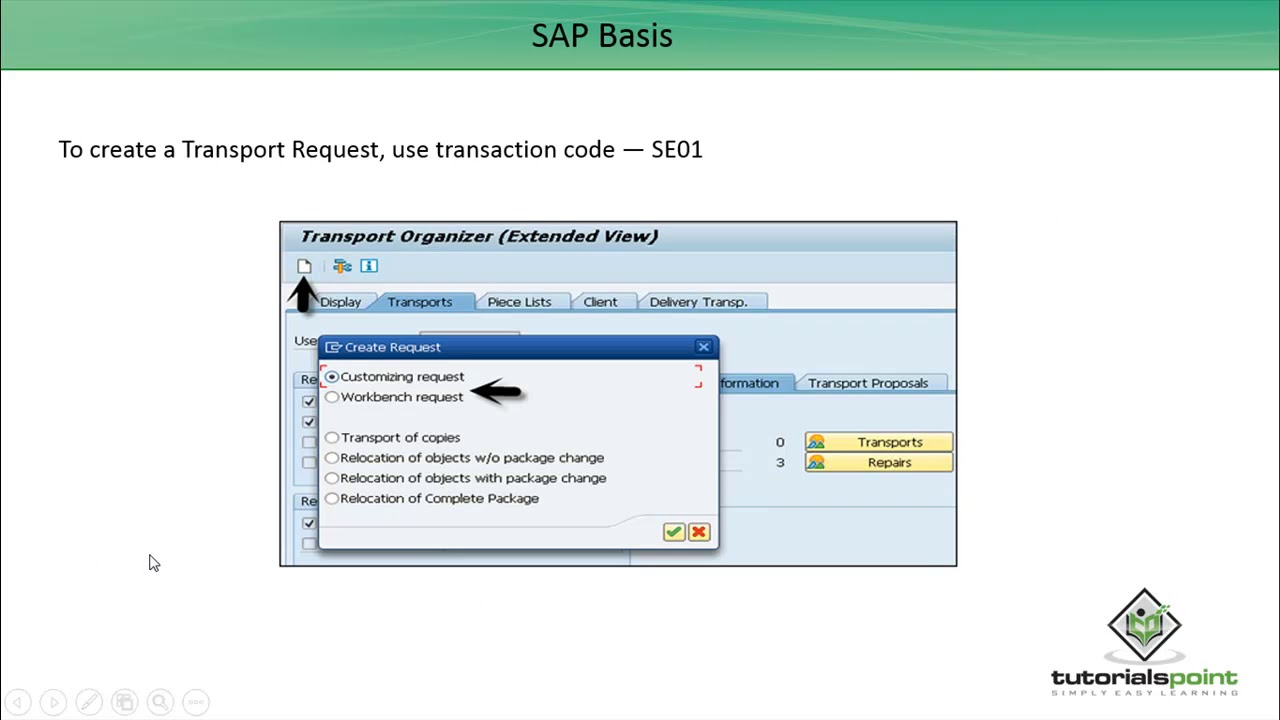
- Workbench requests: Workbench requests contain development objects from the SAP ABAP workbench. These objects can include ABAP programs, function modules, classes, and data types.
- Customizing requests: Customizing requests contain customizing objects. Customizing objects are used to configure SAP to meet the specific needs of your organization.
To create a transport request in SAP, follow these steps:
- In the SAP ABAP workbench, go to Transport > Create Transport Request.
- Enter a request type and a target system.
- Click Create.
- Enter a short description for the transport request.
- Click Save.
To add objects to a transport request, follow these steps:
- In the SAP ABAP workbench, navigate to the object that you want to add to the transport request.
- Select the object and press Ctrl+Shift+F9.
- In the Transport window, select the transport request that you want to add the object to.
- Click Add.
To release a transport request, follow these steps:
- In the SAP ABAP workbench, go to Transport > Release Transport Request.
- Select the transport request that you want to release.
- Click Release.
To import a transport request, you must use the SAP Transport Control Program (STMS). STMS is a command-line tool that is used to manage the transport of data between SAP systems.
To import a transport request using STMS, follow these steps:
- Log in to the target system.
- Navigate to the directory where STMS is installed.
- Run the following command:
stms import trnr where trnr is the name of the transport request that you want to import.
Here are some best practices for using transport requests in SAP:
- Create a new transport request for each change. This will help you to keep your changes organized and to track what changes have been made to each object.
- Include a description in each transport request. This will help other team members to understand what changes the transport request contains.
- Test your changes in the development system before transporting them to another system. This will help you to identify and fix any problems before they affect your production system.
- Release transport requests in a controlled manner. This will help to prevent conflicts between different changes.
Transport requests are an essential part of the SAP development process. They allow you to transport changes to development objects from one SAP system to another in a controlled manner. By following the best practices above, you can help to ensure that your transport requests are successful.
Keyword silo: transport request, SAP, ABAP, development, customizing, workbench, STMS
WebClick this button to open the directory in which you want to save the file. Type the name of the file, and then save the file. The execution history of the transport requests is stored in. WebOn the transport requests overview, the following information is displayed for each transport request: Description: Description that was entered when the transport request was. WebWhenever you need to transport Guided Procedures (GP) content created in your system to other systems, you have to create a Transport Request first. A Transport Request. WebUpload a SAP Transport Request – Made Easy. 5 4 26,034. If you are using third-party ABAP tools in your SAP systems or interested to move an ABAP package to.
SAP Basis - Transport Requests
Source: Youtube.com
SAP Training Session - 3 (English) | What is Transport Request (TR) | Types of TR

Source: Youtube.com
What Is A Transport Request In Sap, SAP Basis - Transport Requests, 7 MB, 05:06, 21,256, Tutorialspoint, 2018-01-09T11:59:05.000000Z, 2, How to find transport Request…. | SAP Blogs, 381 x 583, jpg, , 3, what-is-a-transport-request-in-sap
What Is A Transport Request In Sap. WebA transport request collects development objects and categories for export to your local computer or to an SAP transport system. Creating a transport request comprises three.
SAP Basis - Transport Requests
Watch More Videos at:
tutorialspoint.com/videotutorials/index.htm
Lecture By: Mr. Sumit Agarwal, Tutorials Point India Private Limited.
What Is A Transport Request In Sap, WebOn the transport requests overview, the following information is displayed for each transport request: Description: Description that was entered when the transport request was. WebWhenever you need to transport Guided Procedures (GP) content created in your system to other systems, you have to create a Transport Request first. A Transport Request. WebUpload a SAP Transport Request – Made Easy. 5 4 26,034. If you are using third-party ABAP tools in your SAP systems or interested to move an ABAP package to.
How to find transport Request…. | SAP Blogs - Source: blogs.sap.com

What is SAP Transport Request? How to Import/Export TR - Source: guru99.com

What is SAP Transport Request? How to Import/Export TR - Source: guru99.com

Belum ada tanggapan untuk "What Is A Transport Request In Sap"
Posting Komentar